Cable list
| Label | Source | Destination | Length |
|---|---|---|---|
| A01 | Lead vocal · Out | Stage box · IN 1 | 10 m |
| A02 | Snare · Out | Stage box · IN 2 | 10 m |
| A03 | Keys DI · Out | Stage box · IN 3 | 12 m |
| R01 | Stage box · Dante 1 | FOH console · Dante 1 | 30 m |
Draw the system diagram: the cable list, the patch sheet, the equipment list and the A3 sheet all come out of the same drawing. The link opens on the crew’s phones, no account needed.
Your turn: Rio outputs to the amp, secondary Dante to the desk.Your turn: tap a Rio output, then an amp input.
Keyboard: Tab to a socket, Enter, then Tab to the target socket, Enter. Esc cancels.
Cable list, patch sheet and title block recompute on every line, with the same functions the app uses.
| Label | Source | Destination | Length |
|---|---|---|---|
| A01 | Lead vocal · Out | Stage box · IN 1 | 10 m |
| A02 | Snare · Out | Stage box · IN 2 | 10 m |
| A03 | Keys DI · Out | Stage box · IN 3 | 12 m |
| R01 | Stage box · Dante 1 | FOH console · Dante 1 | 30 m |
| Inputs | Label | Far end |
|---|---|---|
| IN 1 | — | free |
| IN 2 | — | free |
| IN 3 | — | free |
| IN 4 | — | free |
| AES3 IN 1 | — | free |
| AES3 IN 2 | — | free |
| LA Network 1 | — | free |
| LA Network 2 | — | free |
| Power | — | free |
One more cable: the sheet routes it, bundles it with its neighbours when it can, and the title block recounts.
An etherCON on both ends, the plug goes in without forcing, and nothing will get through: one side is Ethernet, the other is Dante. Usually you find out at soundcheck. Here, the moment you pull the line. Written, reviewed, tested rules. Nothing guesses.
A port crosses three independent pieces of information: its direction (input, output, bidirectional), the type of signal it carries, and its physical connector. An RJ45 says nothing on its own: it can carry Dante, Art-Net, or a control link. That’s why a cable Technipatch refuses is always refused for a precise reason — incompatible signal, incompatible connector, or both at once.
Incompatible signals: Network (Ethernet) on one side, Dante on the other.
Same etherCON on both ends, not the same signal.
Frame, title block, signal legend, a label on every cable. It reads like a drawing, A3 on the FOH desk or A0 on the warehouse wall, and it goes out without passing through another piece of software.
The full diagram, framed and captioned, ready to send to the client or hang in FOH.
PDF A3 and A4, vector SVG, PNG at 200 dpi, CSV for each of the three documents, and a project file (.technipatch) that reopens the full diagram, minus undo history.
The sheet exports from A5 to A0, portrait or landscape; when a device carries a rack height in U, a separate rack elevation stacks it bottom to top by location, with the free U left visible at the top of each frame.
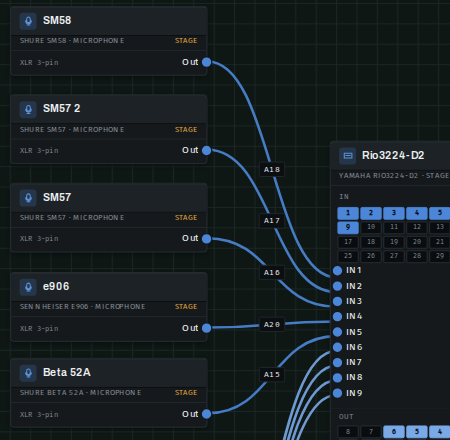
A sound diagram end to end: twenty devices, three zones, thirty-one cables — microphones, stage box, console, in-ears, amplifiers and speakers. An audio example, not an all-trades stage.
Five device families, plus a free category for whatever no entry covers yet:
As soon as a project mixes two families or more, tabs appear above the canvas to isolate one at a time — lighting alone, audio alone — recomputed from the same diagram, never stored separately.
Nine moves that don’t show themselves at first glance, but do most of the time-saving once you’ve found them.
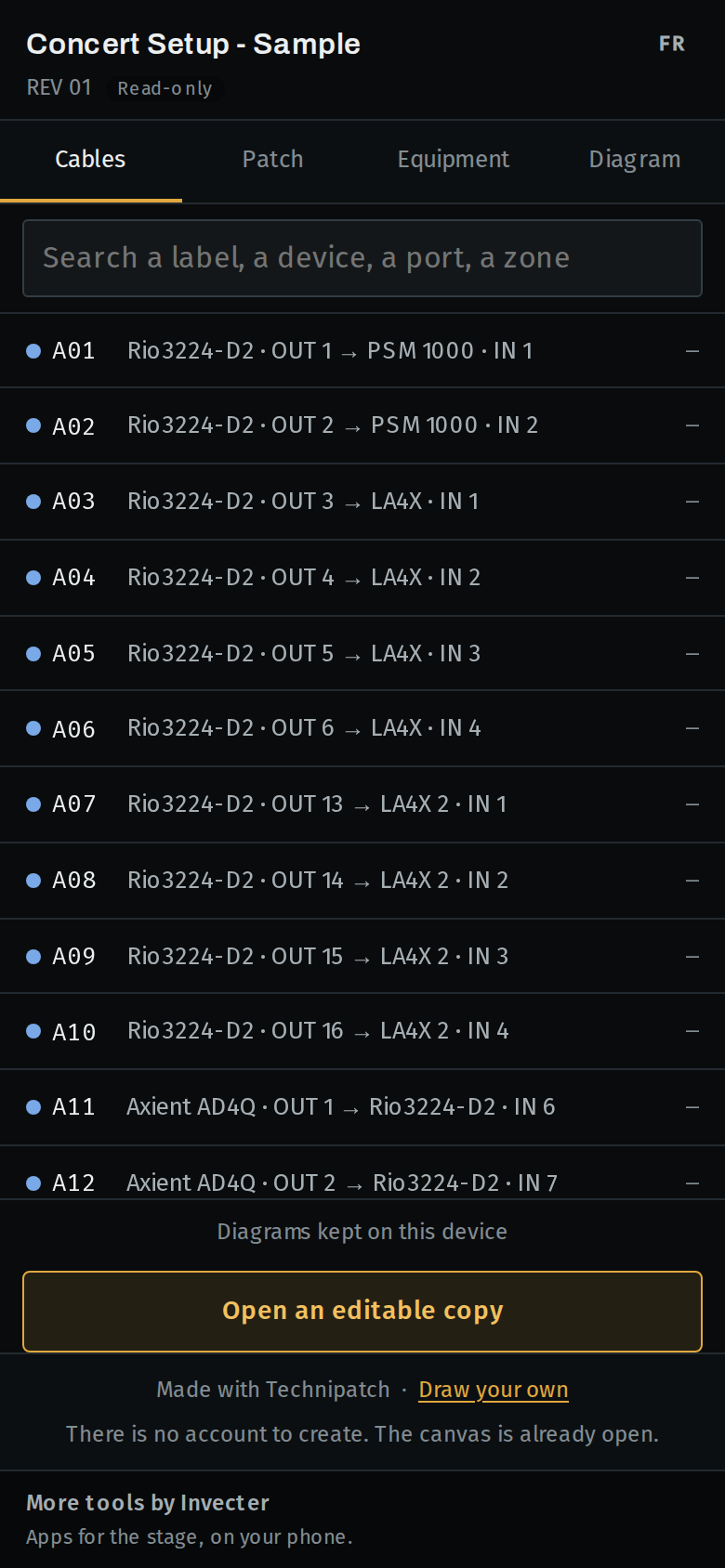
Sharing is a link: it opens the diagram read-only, no account needed at the other end. A fragment link carries the project in its own address; a saved project carries a token that always opens its latest revision.
The link also opens in the field viewer: installed on a phone like an app, it stays readable offline, down into a venue’s basement, and its search indexes cable content too.
The title block’s link opens the field viewer: it installs on a phone and stays readable without a network, right down into a venue’s basement.
Drawing and sharing by link ask for no account at all. Saving a project to the server, to find it again from another machine, takes a free account, created by verifying an email address with a code sent to it; each save stacks a new revision, it never replaces one.
The words Technipatch keeps as-is, instead of translating them into software jargon.
The moves that come up a hundred times per plan. “Ctrl / ⌘” means whichever command key your system uses.
| Action | Keys |
|---|---|
| Open the command palette | Ctrl / ⌘ + K |
| Undo | Ctrl / ⌘ + Z |
| Redo | Ctrl / ⌘ + Shift + Z |
| Duplicate the selection | Ctrl / ⌘ + D |
| Select all | Ctrl / ⌘ + A |
| Delete the selection | Delete or Backspace |
| Add a note | N |
| Collapse or expand the selected device | M |
| Selection tool (the arrow) | V |
| Pan tool (move the view) | H |
| Frame the whole diagram | 0 |
| Close, or cancel the move in progress | Esc |
| Open the context menu from the keyboard | Menu key, or Shift + F10 |
Said plainly, a deliberate limit is a reason to trust the product, not a confession of weakness: it says where the product stops and why, instead of letting everyone discover it in production.
Left out on purpose: a full quoting/ERP suite, 3D and architectural CAD, an AI that would “draw everything from a text prompt”, a million-part generic catalog, and the exotic export formats reserved for integration suites.
An official festival video system diagram, handed over as a PowerPoint deck, makes the case on its own: eighteen connectors with only one actually attached to a shape, “8 streams” arrows that are nothing but drawings, nothing that counts anything. Technipatch refuses to reproduce that move — a free line attached to no port would make a worse PowerPoint than PowerPoint, and it would break the one invariant that makes the product what it is: a line is a cable, so it gets listed, numbered and checked.
Every need those arrows served has a modelled answer earlier on this page: cable content for “where do my mixes go”, the zone frames for the overview, and bundling for the big “8 streams” arrow — eight real cables, on eight real ports.